×
Ricerca articoli
Cerca e inserisci il collegamento a un articolo pubblicato da TurboLab.it
Digita almeno 3 caratteri, poi premi "Invio"
I "Commenti" ad ogni articolo pubblicato sul nostro sito sono raccolti qui.
Regole del forum
Puoi rispondere alle discussioni già presenti, ma non aprirne di nuove.
crazy.cat
Amministratore
Messaggi: 13658 Iscritto il: mer mag 01, 2013 4:02 pm
Località: Noventa Padovana
Has thanked: 10 times
Been thanked: 140 times
Messaggio
da crazy.cat » gio giu 04, 2026 7:35 am
Estrarre le operazioni pianificate per trovare quelle sospette o inutili
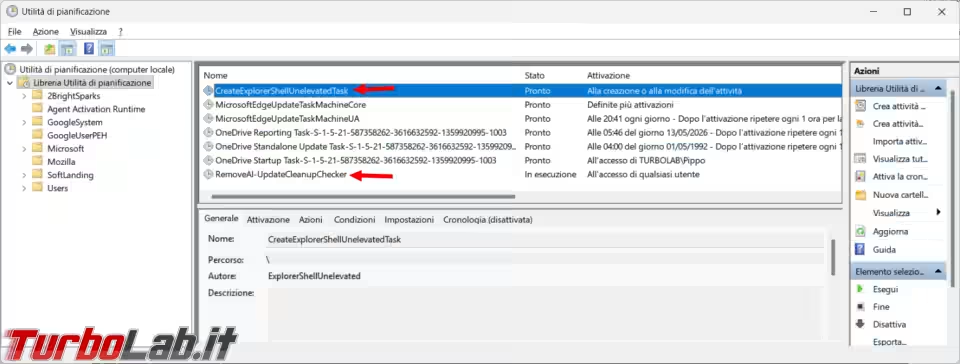
Da qualche giorno notavo uno strano aumento dell'attività della ventola del mio computer, non giustificata né dal caldo o da operazioni particolarmente pesanti nel sistema operativo. Mentre provavo uno script per la rilevazione delle operazioni pianificate, o task, ne vedo due particolarmente strane, di cui una RemoveAI-UpdateCleanupChecker che rimaneva sempre attiva. [continua.. ]
---
Cosa ne pensi? Lascia il tuo commento qui sotto.
sourceman
Livello: Scheda perforata (1/15)
Messaggi: 12 Iscritto il: mar feb 16, 2021 4:07 pm
Has thanked: 2 times
Been thanked: 7 times
Messaggio
da sourceman » gio giu 04, 2026 9:28 am
non si apre il report col browser di default nel mio caso firefox
crazy.cat
Amministratore
Messaggi: 13658 Iscritto il: mer mag 01, 2013 4:02 pm
Località: Noventa Padovana
Has thanked: 10 times
Been thanked: 140 times
Messaggio
da crazy.cat » gio giu 04, 2026 10:17 am
sourceman ha scritto: gio giu 04, 2026 9:28 am
non si apre il report col browser di default nel mio caso firefox
ti da degli errori?
Il file viene salvato sul desktop?
La prima legge della dietetica sembra essere: se il sapore è buono, a te fa male.
cippico
Livello: Rack 42U (13/15)
Messaggi: 2252 Iscritto il: gio mag 16, 2013 6:16 pm
Has thanked: 27 times
Been thanked: 9 times
Messaggio
da cippico » gio giu 04, 2026 7:15 pm
sembra proprio interessante...se trovo un po' di tempo lo provo...
grazie
Salutone a Zane...padre putativo di...Turbolab... :-)
Mio sito... http://www.cippico.altervista.org
sourceman
Livello: Scheda perforata (1/15)
Messaggi: 12 Iscritto il: mar feb 16, 2021 4:07 pm
Has thanked: 2 times
Been thanked: 7 times
Messaggio
da sourceman » gio giu 04, 2026 10:06 pm
crazy.cat ha scritto: gio giu 04, 2026 10:17 am
sourceman ha scritto: gio giu 04, 2026 9:28 am
non si apre il report col browser di default nel mio caso firefox
ti da degli errori?
Il file viene salvato sul desktop?
con le opportune autorizzazioni...-ExecutionPolicy Bypass -File "C:\percorso\completo\Report-TaskScheduler.ps1"
e con le opportune modifiche adesso funziona bene
[CmdletBinding()]
param (
[string]$FileName = "Report_Operazioni_Pianificate.html"
)
function Resolve-ActionPath {
param ([string]$Path)
if ([string]::IsNullOrWhiteSpace($Path)) { return $null }
$Path = [Environment]::ExpandEnvironmentVariables($Path.Trim('"'))
if ([System.IO.Path]::IsPathRooted($Path)) { return $Path }
$Command = Get-Command -Name $Path -ErrorAction SilentlyContinue
if ($Command) { return $Command.Source }
return $Path
}
function Get-TaskCategory {
param (
[object]$Task,
[object]$Action,
[string]$ResolvedPath
)
$ActionText = "$($Action.Execute) $($Action.Arguments)"
$Reasons = @()
# 1. Controlla l'origine Microsoft
$IsMicrosoft = (
$Task.TaskPath -like '\Microsoft\windows\' -or
$Task.Author -match 'Microsoft' -or
$ResolvedPath -match 'C:\\windows\\(System32|SysWOW64|WinSxS)\\\\' -or
$Task.TaskPath -like '\Microsoft\*'
)
# 2. Raccoglie i motivi di analisi
if (-not $IsMicrosoft) { $Reasons += 'NonMicrosoftPath' }
if ($Task.Settings.Hidden) { $Reasons += 'Hidden' }
if ($ActionText -match '(?i)mshta|regsvr32|rundl132|wscript|cscript|bitsadmin|certutil') {
$Reasons += 'SuspiciousLoblin'
}
# 3. Determina la categoria finale
$ReasonString = if ($Reasons.Count -gt 0) { $Reasons -join ' ' } else { 'None' }
$Category = if ($IsMicrosoft) { "Microsoft" } elseif ($Reasons.Count -gt 0) { "Suspicious" } else { "Normal" }
return [PSCustomObject]@{
Category = $Category
Reason = $ReasonString
}
}
# --- ESECUZIONE ---
$DesktopPath = [Environment]::GetFolderPath("Desktop")
$OutputPath = Join-Path $DesktopPath $FileName
# 1. Recupera e processa i dati dei task
$Tasks = Get-ScheduledTask
$ReportData = foreach ($Task in $Tasks) {
# Risoluzione avanzata dell'identità
$RunAsUser = ""
if (-not [string]::IsNullOrWhiteSpace($Task.Principal.UserId)) {
$RunAsUser = $Task.Principal.UserId
}
elseif (-not [string]::IsNullOrWhiteSpace($Task.Principal.GroupId)) {
$RunAsUser = $Task.Principal.GroupId
}
elseif ($Task.Principal.LogonType -eq 'InteractiveToken') {
$RunAsUser = "Logged-in User"
}
else {
if ($Task.TaskPath -match '^\\Microsoft\\') {
$RunAsUser = "SYSTEM"
} else {
$RunAsUser = "Local System Account"
}
}
# Pulizia dei nomi dei gruppi più comuni
switch -regex ($RunAsUser) {
"S-1-5-18|LocalSystem" { $RunAsUser = "SYSTEM" }
"S-1-5-19|LocalService" { $RunAsUser = "LOCAL SERVICE" }
"S-1-5-20|NetworkService" { $RunAsUser = "NETWORK SERVICE" }
"S-1-5-32-544|Administrators" { $RunAsUser = "Administrators" }
"S-1-5-32-545|Users" { $RunAsUser = "Users" }
}
foreach ($Action in $Task.Actions) {
$ResolvedPath = Resolve-ActionPath -Path $Action.Execute
$Analysis = Get-TaskCategory -Task $Task -Action $Action -ResolvedPath $ResolvedPath
[PSCustomObject]@{
TaskName = $Task.TaskName
TaskPath = $Task.TaskPath
RunAsUser = $RunAsUser
Execute = $Action.Execute
Arguments = $Action.Arguments
Category = $Analysis.Category
Reason = $Analysis.Reason
State = $Task.State
}
}
}
# 2. Definizione dello stile CSS per l'HTML
$CSS = @"
<style>
body { font-family: 'Segoe UI', Tahoma, Geneva, Verdana, sans-serif; margin: 20px; background-color: #f9f9f9; color: #333; }
h2 { color: #005a9e; }
table { border-collapse: collapse; width: 100%; margin-top: 20px; background-color: #fff; box-shadow: 0 2px 5px rgba(0,0,0,0.1); }
th { background-color: #005a9e; color: white !important; padding: 12px; text-align: left; font-size: 14px; }
td { padding: 10px; border-bottom: 1px solid #ddd; font-size: 13px; vertical-align: top; word-wrap: break-word; overflow-wrap: break-word; }
tr:hover { background-color: #f1f1f1; }
.col-name { width: 16%; }
.col-path { width: 12%; }
.col-user { width: 10%; }
.col-execute { width: 25%; }
.col-args { width: 12%; }
.col-cat { width: 10%; }
.col-reason { width: 10%; }
.col-state { width: 5%; }
tbody .col-name { font-weight: bold; }
tbody .col-path { color: #555; }
tbody .col-user { color: #444; }
tbody .col-execute { font-family: 'Consolas', monospace; color: #005a9e; }
tbody .col-args { font-family: 'Consolas', monospace; color: #666; }
tbody .col-cat { text-align: center; }
tbody .col-state { text-align: center; }
.cat-microsoft { background-color: #e1f5fe; color: #0288d1; font-weight: bold; padding: 4px 8px; border-radius: 4px; display: inline-block; }
.cat-normal { background-color: #e8f5e9; color: #2e7d32; font-weight: bold; padding: 4px 8px; border-radius: 4px; display: inline-block; }
.cat-suspicious { background-color: #ffebee; color: #c62828; font-weight: bold; padding: 4px 8px; border-radius: 4px; display: inline-block; }
.user-system { color: #d32f2f !important; font-weight: bold; }
</style>
"@
# 3. Generazione delle righe HTML
$TableRows = foreach ($Row in $ReportData) {
$CatClass = switch ($Row.Category) {
"Microsoft" { "cat-microsoft" }
"Normal" { "cat-normal" }
"Suspicious" { "cat-suspicious" }
}
$UserStyle = if ($Row.RunAsUser -match 'SYSTEM|SERVICE|Administrators') { "user-system" } else { "" }
@"
<tr>
<td class="col-name">$($Row.TaskName)</td>
<td class="col-path">$($Row.TaskPath)</td>
<td class="col-user $UserStyle">$($Row.RunAsUser)</td>
<td class="col-execute">$($Row.Execute)</td>
<td class="col-args">$($Row.Arguments)</td>
<td class="col-cat"><span class="$CatClass">$($Row.Category)</span></td>
<td class="col-reason">$($Row.Reason)</td>
<td class="col-state">$($Row.State)</td>
</tr>
"@
}
# 4. Assemblaggio finale del file HTML
$HtmlContent = @"
<!DOCTYPE html>
<html lang="it">
<head>
<meta charset="UTF-8">
<title>Elenco Operazioni Pianificate</title>
$CSS
</head>
<body>
<h2>Rapporto Operazioni Pianificate</h2>
<p>Generato il: $(Get-Date -Format 'dd/MM/yyyy HH:mm:ss')</p>
<table>
<thead>
<tr>
<th class="col-name">Nome Operazione Pianificata</th>
<th class="col-path">Cartella del task</th>
<th class="col-user">Avviato da</th>
<th class="col-execute">Programma</th>
<th class="col-args">Argomenti</th>
<th class="col-cat">Categoria</th>
<th class="col-reason">Motivo</th>
<th class="col-state">Stato</th>
</tr>
</thead>
<tbody>
$($TableRows -join "`n")
</tbody>
</table>
</body>
</html>
"@
# 5. Salvataggio del file sul Desktop
$HtmlContent | Out-File -FilePath $OutputPath -Encoding UTF8
Write-Host "Report HTML generato con successo in: $OutputPath" -ForegroundColor Green
# 6. Apertura automatica del file con il browser di default
Invoke-Item -Path $OutputPath
Questo contenuto è nascosto, ma senza JavaScript non puoi gestirlo correttamente. Passa con il mouse sopra a questo testo per visualizzarlo!
[CmdletBinding()]
param (
[string]$FileName = "Report_Operazioni_Pianificate.html"
)
function Resolve-ActionPath {
param ([string]$Path)
if ([string]::IsNullOrWhiteSpace($Path)) { return $null }
$Path = [Environment]::ExpandEnvironmentVariables($Path.Trim('"'))
if ([System.IO.Path]::IsPathRooted($Path)) { return $Path }
$Command = Get-Command -Name $Path -ErrorAction SilentlyContinue
if ($Command) { return $Command.Source }
return $Path
}
function Get-TaskCategory {
param (
[object]$Task,
[object]$Action,
[string]$ResolvedPath
)
$ActionText = "$($Action.Execute) $($Action.Arguments)"
$Reasons = @()
# 1. Controlla l'origine Microsoft
$IsMicrosoft = (
$Task.TaskPath -like '\Microsoft\windows\' -or
$Task.Author -match 'Microsoft' -or
$ResolvedPath -match 'C:\\windows\\(System32|SysWOW64|WinSxS)\\\\' -or
$Task.TaskPath -like '\Microsoft\*'
)
# 2. Raccoglie i motivi di analisi
if (-not $IsMicrosoft) { $Reasons += 'NonMicrosoftPath' }
if ($Task.Settings.Hidden) { $Reasons += 'Hidden' }
if ($ActionText -match '(?i)mshta|regsvr32|rundl132|wscript|cscript|bitsadmin|certutil') {
$Reasons += 'SuspiciousLoblin'
}
# 3. Determina la categoria finale
$ReasonString = if ($Reasons.Count -gt 0) { $Reasons -join ' ' } else { 'None' }
$Category = if ($IsMicrosoft) { "Microsoft" } elseif ($Reasons.Count -gt 0) { "Suspicious" } else { "Normal" }
return [PSCustomObject]@{
Category = $Category
Reason = $ReasonString
}
}
# --- ESECUZIONE ---
$DesktopPath = [Environment]::GetFolderPath("Desktop")
$OutputPath = Join-Path $DesktopPath $FileName
# 1. Recupera e processa i dati dei task
$Tasks = Get-ScheduledTask
$ReportData = foreach ($Task in $Tasks) {
# Risoluzione avanzata dell'identità
$RunAsUser = ""
if (-not [string]::IsNullOrWhiteSpace($Task.Principal.UserId)) {
$RunAsUser = $Task.Principal.UserId
}
elseif (-not [string]::IsNullOrWhiteSpace($Task.Principal.GroupId)) {
$RunAsUser = $Task.Principal.GroupId
}
elseif ($Task.Principal.LogonType -eq 'InteractiveToken') {
$RunAsUser = "Logged-in User"
}
else {
if ($Task.TaskPath -match '^\\Microsoft\\') {
$RunAsUser = "SYSTEM"
} else {
$RunAsUser = "Local System Account"
}
}
# Pulizia dei nomi dei gruppi più comuni
switch -regex ($RunAsUser) {
"S-1-5-18|LocalSystem" { $RunAsUser = "SYSTEM" }
"S-1-5-19|LocalService" { $RunAsUser = "LOCAL SERVICE" }
"S-1-5-20|NetworkService" { $RunAsUser = "NETWORK SERVICE" }
"S-1-5-32-544|Administrators" { $RunAsUser = "Administrators" }
"S-1-5-32-545|Users" { $RunAsUser = "Users" }
}
foreach ($Action in $Task.Actions) {
$ResolvedPath = Resolve-ActionPath -Path $Action.Execute
$Analysis = Get-TaskCategory -Task $Task -Action $Action -ResolvedPath $ResolvedPath
[PSCustomObject]@{
TaskName = $Task.TaskName
TaskPath = $Task.TaskPath
RunAsUser = $RunAsUser
Execute = $Action.Execute
Arguments = $Action.Arguments
Category = $Analysis.Category
Reason = $Analysis.Reason
State = $Task.State
}
}
}
# 2. Definizione dello stile CSS per l'HTML
$CSS = @"
<style>
body { font-family: 'Segoe UI', Tahoma, Geneva, Verdana, sans-serif; margin: 20px; background-color: #f9f9f9; color: #333; }
h2 { color: #005a9e; }
table { border-collapse: collapse; width: 100%; margin-top: 20px; background-color: #fff; box-shadow: 0 2px 5px rgba(0,0,0,0.1); }
th { background-color: #005a9e; color: white !important; padding: 12px; text-align: left; font-size: 14px; }
td { padding: 10px; border-bottom: 1px solid #ddd; font-size: 13px; vertical-align: top; word-wrap: break-word; overflow-wrap: break-word; }
tr:hover { background-color: #f1f1f1; }
.col-name { width: 16%; }
.col-path { width: 12%; }
.col-user { width: 10%; }
.col-execute { width: 25%; }
.col-args { width: 12%; }
.col-cat { width: 10%; }
.col-reason { width: 10%; }
.col-state { width: 5%; }
tbody .col-name { font-weight: bold; }
tbody .col-path { color: #555; }
tbody .col-user { color: #444; }
tbody .col-execute { font-family: 'Consolas', monospace; color: #005a9e; }
tbody .col-args { font-family: 'Consolas', monospace; color: #666; }
tbody .col-cat { text-align: center; }
tbody .col-state { text-align: center; }
.cat-microsoft { background-color: #e1f5fe; color: #0288d1; font-weight: bold; padding: 4px 8px; border-radius: 4px; display: inline-block; }
.cat-normal { background-color: #e8f5e9; color: #2e7d32; font-weight: bold; padding: 4px 8px; border-radius: 4px; display: inline-block; }
.cat-suspicious { background-color: #ffebee; color: #c62828; font-weight: bold; padding: 4px 8px; border-radius: 4px; display: inline-block; }
.user-system { color: #d32f2f !important; font-weight: bold; }
</style>
"@
# 3. Generazione delle righe HTML
$TableRows = foreach ($Row in $ReportData) {
$CatClass = switch ($Row.Category) {
"Microsoft" { "cat-microsoft" }
"Normal" { "cat-normal" }
"Suspicious" { "cat-suspicious" }
}
$UserStyle = if ($Row.RunAsUser -match 'SYSTEM|SERVICE|Administrators') { "user-system" } else { "" }
@"
<tr>
<td class="col-name">$($Row.TaskName)</td>
<td class="col-path">$($Row.TaskPath)</td>
<td class="col-user $UserStyle">$($Row.RunAsUser)</td>
<td class="col-execute">$($Row.Execute)</td>
<td class="col-args">$($Row.Arguments)</td>
<td class="col-cat"><span class="$CatClass">$($Row.Category)</span></td>
<td class="col-reason">$($Row.Reason)</td>
<td class="col-state">$($Row.State)</td>
</tr>
"@
}
# 4. Assemblaggio finale del file HTML
$HtmlContent = @"
<!DOCTYPE html>
<html lang="it">
<head>
<meta charset="UTF-8">
<title>Elenco Operazioni Pianificate</title>
$CSS
</head>
<body>
<h2>Rapporto Operazioni Pianificate</h2>
<p>Generato il: $(Get-Date -Format 'dd/MM/yyyy HH:mm:ss')</p>
<table>
<thead>
<tr>
<th class="col-name">Nome Operazione Pianificata</th>
<th class="col-path">Cartella del task</th>
<th class="col-user">Avviato da</th>
<th class="col-execute">Programma</th>
<th class="col-args">Argomenti</th>
<th class="col-cat">Categoria</th>
<th class="col-reason">Motivo</th>
<th class="col-state">Stato</th>
</tr>
</thead>
<tbody>
$($TableRows -join "`n")
</tbody>
</table>
</body>
</html>
"@
# 5. Salvataggio del file sul Desktop
$HtmlContent | Out-File -FilePath $OutputPath -Encoding UTF8
Write-Host "Report HTML generato con successo in: $OutputPath" -ForegroundColor Green
# 6. Apertura automatica del file con il browser di default
Invoke-Item -Path $OutputPath