×
Ricerca articoli
Cerca e inserisci il collegamento a un articolo pubblicato da TurboLab.it
Digita almeno 3 caratteri, poi premi "Invio"
I "Commenti" ad ogni articolo pubblicato sul nostro sito sono raccolti qui.
Regole del forum
Puoi rispondere alle discussioni già presenti, ma non aprirne di nuove.
crazy.cat
Amministratore
Messaggi: 13669 Iscritto il: mer mag 01, 2013 4:02 pm
Località: Noventa Padovana
Has thanked: 11 times
Been thanked: 147 times
Messaggio
da crazy.cat » gio giu 04, 2026 7:35 am
Estrarre le operazioni pianificate per trovare quelle sospette o inutili
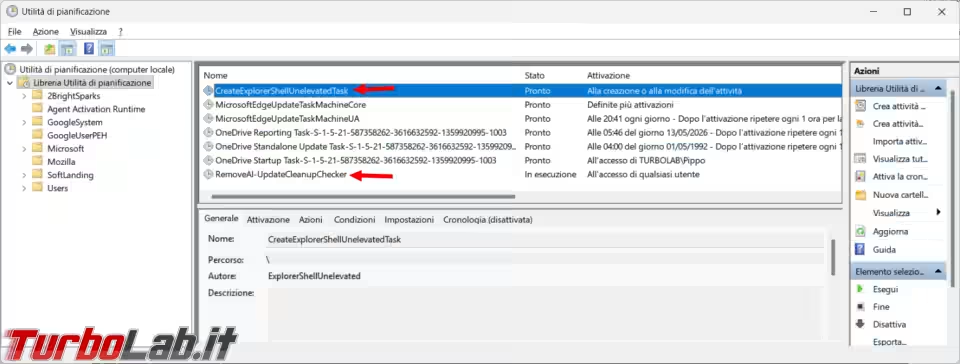
Da qualche giorno notavo uno strano aumento dell'attività della ventola del mio computer, non giustificata né dal caldo o da operazioni particolarmente pesanti nel sistema operativo. Mentre provavo uno script per la rilevazione delle operazioni pianificate, o task, ne vedo due particolarmente strane, di cui una RemoveAI-UpdateCleanupChecker che rimaneva sempre attiva. [continua.. ]
---
Cosa ne pensi? Lascia il tuo commento qui sotto.
sourceman
Livello: EPROM (2/15)
Messaggi: 15 Iscritto il: mar feb 16, 2021 4:07 pm
Has thanked: 2 times
Been thanked: 7 times
Messaggio
da sourceman » gio giu 04, 2026 9:28 am
non si apre il report col browser di default nel mio caso firefox
crazy.cat
Amministratore
Messaggi: 13669 Iscritto il: mer mag 01, 2013 4:02 pm
Località: Noventa Padovana
Has thanked: 11 times
Been thanked: 147 times
Messaggio
da crazy.cat » gio giu 04, 2026 10:17 am
sourceman ha scritto: gio giu 04, 2026 9:28 am
non si apre il report col browser di default nel mio caso firefox
ti da degli errori?
Il file viene salvato sul desktop?
La prima legge della dietetica sembra essere: se il sapore è buono, a te fa male.
cippico
Livello: Rack 42U (13/15)
Messaggi: 2262 Iscritto il: gio mag 16, 2013 6:16 pm
Has thanked: 27 times
Been thanked: 9 times
Messaggio
da cippico » gio giu 04, 2026 7:15 pm
sembra proprio interessante...se trovo un po' di tempo lo provo...
grazie
Salutone a Zane...padre putativo di...Turbolab... :-)
Mio sito... http://www.cippico.altervista.org
sourceman
Livello: EPROM (2/15)
Messaggi: 15 Iscritto il: mar feb 16, 2021 4:07 pm
Has thanked: 2 times
Been thanked: 7 times
Messaggio
da sourceman » gio giu 04, 2026 10:06 pm
crazy.cat ha scritto: gio giu 04, 2026 10:17 am
sourceman ha scritto: gio giu 04, 2026 9:28 am
non si apre il report col browser di default nel mio caso firefox
ti da degli errori?
Il file viene salvato sul desktop?
con le opportune autorizzazioni...-ExecutionPolicy Bypass -File "C:\percorso\completo\Report-TaskScheduler.ps1"
e con le opportune modifiche adesso funziona bene
[CmdletBinding()]
param (
[string]$FileName = "Report_Operazioni_Pianificate.html"
)
function Resolve-ActionPath {
param ([string]$Path)
if ([string]::IsNullOrWhiteSpace($Path)) { return $null }
$Path = [Environment]::ExpandEnvironmentVariables($Path.Trim('"'))
if ([System.IO.Path]::IsPathRooted($Path)) { return $Path }
$Command = Get-Command -Name $Path -ErrorAction SilentlyContinue
if ($Command) { return $Command.Source }
return $Path
}
function Get-TaskCategory {
param (
[object]$Task,
[object]$Action,
[string]$ResolvedPath
)
$ActionText = "$($Action.Execute) $($Action.Arguments)"
$Reasons = @()
# 1. Controlla l'origine Microsoft
$IsMicrosoft = (
$Task.TaskPath -like '\Microsoft\windows\' -or
$Task.Author -match 'Microsoft' -or
$ResolvedPath -match 'C:\\windows\\(System32|SysWOW64|WinSxS)\\\\' -or
$Task.TaskPath -like '\Microsoft\*'
)
# 2. Raccoglie i motivi di analisi
if (-not $IsMicrosoft) { $Reasons += 'NonMicrosoftPath' }
if ($Task.Settings.Hidden) { $Reasons += 'Hidden' }
if ($ActionText -match '(?i)mshta|regsvr32|rundl132|wscript|cscript|bitsadmin|certutil') {
$Reasons += 'SuspiciousLoblin'
}
# 3. Determina la categoria finale
$ReasonString = if ($Reasons.Count -gt 0) { $Reasons -join ' ' } else { 'None' }
$Category = if ($IsMicrosoft) { "Microsoft" } elseif ($Reasons.Count -gt 0) { "Suspicious" } else { "Normal" }
return [PSCustomObject]@{
Category = $Category
Reason = $ReasonString
}
}
# --- ESECUZIONE ---
$DesktopPath = [Environment]::GetFolderPath("Desktop")
$OutputPath = Join-Path $DesktopPath $FileName
# 1. Recupera e processa i dati dei task
$Tasks = Get-ScheduledTask
$ReportData = foreach ($Task in $Tasks) {
# Risoluzione avanzata dell'identità
$RunAsUser = ""
if (-not [string]::IsNullOrWhiteSpace($Task.Principal.UserId)) {
$RunAsUser = $Task.Principal.UserId
}
elseif (-not [string]::IsNullOrWhiteSpace($Task.Principal.GroupId)) {
$RunAsUser = $Task.Principal.GroupId
}
elseif ($Task.Principal.LogonType -eq 'InteractiveToken') {
$RunAsUser = "Logged-in User"
}
else {
if ($Task.TaskPath -match '^\\Microsoft\\') {
$RunAsUser = "SYSTEM"
} else {
$RunAsUser = "Local System Account"
}
}
# Pulizia dei nomi dei gruppi più comuni
switch -regex ($RunAsUser) {
"S-1-5-18|LocalSystem" { $RunAsUser = "SYSTEM" }
"S-1-5-19|LocalService" { $RunAsUser = "LOCAL SERVICE" }
"S-1-5-20|NetworkService" { $RunAsUser = "NETWORK SERVICE" }
"S-1-5-32-544|Administrators" { $RunAsUser = "Administrators" }
"S-1-5-32-545|Users" { $RunAsUser = "Users" }
}
foreach ($Action in $Task.Actions) {
$ResolvedPath = Resolve-ActionPath -Path $Action.Execute
$Analysis = Get-TaskCategory -Task $Task -Action $Action -ResolvedPath $ResolvedPath
[PSCustomObject]@{
TaskName = $Task.TaskName
TaskPath = $Task.TaskPath
RunAsUser = $RunAsUser
Execute = $Action.Execute
Arguments = $Action.Arguments
Category = $Analysis.Category
Reason = $Analysis.Reason
State = $Task.State
}
}
}
# 2. Definizione dello stile CSS per l'HTML
$CSS = @"
<style>
body { font-family: 'Segoe UI', Tahoma, Geneva, Verdana, sans-serif; margin: 20px; background-color: #f9f9f9; color: #333; }
h2 { color: #005a9e; }
table { border-collapse: collapse; width: 100%; margin-top: 20px; background-color: #fff; box-shadow: 0 2px 5px rgba(0,0,0,0.1); }
th { background-color: #005a9e; color: white !important; padding: 12px; text-align: left; font-size: 14px; }
td { padding: 10px; border-bottom: 1px solid #ddd; font-size: 13px; vertical-align: top; word-wrap: break-word; overflow-wrap: break-word; }
tr:hover { background-color: #f1f1f1; }
.col-name { width: 16%; }
.col-path { width: 12%; }
.col-user { width: 10%; }
.col-execute { width: 25%; }
.col-args { width: 12%; }
.col-cat { width: 10%; }
.col-reason { width: 10%; }
.col-state { width: 5%; }
tbody .col-name { font-weight: bold; }
tbody .col-path { color: #555; }
tbody .col-user { color: #444; }
tbody .col-execute { font-family: 'Consolas', monospace; color: #005a9e; }
tbody .col-args { font-family: 'Consolas', monospace; color: #666; }
tbody .col-cat { text-align: center; }
tbody .col-state { text-align: center; }
.cat-microsoft { background-color: #e1f5fe; color: #0288d1; font-weight: bold; padding: 4px 8px; border-radius: 4px; display: inline-block; }
.cat-normal { background-color: #e8f5e9; color: #2e7d32; font-weight: bold; padding: 4px 8px; border-radius: 4px; display: inline-block; }
.cat-suspicious { background-color: #ffebee; color: #c62828; font-weight: bold; padding: 4px 8px; border-radius: 4px; display: inline-block; }
.user-system { color: #d32f2f !important; font-weight: bold; }
</style>
"@
# 3. Generazione delle righe HTML
$TableRows = foreach ($Row in $ReportData) {
$CatClass = switch ($Row.Category) {
"Microsoft" { "cat-microsoft" }
"Normal" { "cat-normal" }
"Suspicious" { "cat-suspicious" }
}
$UserStyle = if ($Row.RunAsUser -match 'SYSTEM|SERVICE|Administrators') { "user-system" } else { "" }
@"
<tr>
<td class="col-name">$($Row.TaskName)</td>
<td class="col-path">$($Row.TaskPath)</td>
<td class="col-user $UserStyle">$($Row.RunAsUser)</td>
<td class="col-execute">$($Row.Execute)</td>
<td class="col-args">$($Row.Arguments)</td>
<td class="col-cat"><span class="$CatClass">$($Row.Category)</span></td>
<td class="col-reason">$($Row.Reason)</td>
<td class="col-state">$($Row.State)</td>
</tr>
"@
}
# 4. Assemblaggio finale del file HTML
$HtmlContent = @"
<!DOCTYPE html>
<html lang="it">
<head>
<meta charset="UTF-8">
<title>Elenco Operazioni Pianificate</title>
$CSS
</head>
<body>
<h2>Rapporto Operazioni Pianificate</h2>
<p>Generato il: $(Get-Date -Format 'dd/MM/yyyy HH:mm:ss')</p>
<table>
<thead>
<tr>
<th class="col-name">Nome Operazione Pianificata</th>
<th class="col-path">Cartella del task</th>
<th class="col-user">Avviato da</th>
<th class="col-execute">Programma</th>
<th class="col-args">Argomenti</th>
<th class="col-cat">Categoria</th>
<th class="col-reason">Motivo</th>
<th class="col-state">Stato</th>
</tr>
</thead>
<tbody>
$($TableRows -join "`n")
</tbody>
</table>
</body>
</html>
"@
# 5. Salvataggio del file sul Desktop
$HtmlContent | Out-File -FilePath $OutputPath -Encoding UTF8
Write-Host "Report HTML generato con successo in: $OutputPath" -ForegroundColor Green
# 6. Apertura automatica del file con il browser di default
Invoke-Item -Path $OutputPath
Questo contenuto è nascosto, ma senza JavaScript non puoi gestirlo correttamente. Passa con il mouse sopra a questo testo per visualizzarlo!
[CmdletBinding()]
param (
[string]$FileName = "Report_Operazioni_Pianificate.html"
)
function Resolve-ActionPath {
param ([string]$Path)
if ([string]::IsNullOrWhiteSpace($Path)) { return $null }
$Path = [Environment]::ExpandEnvironmentVariables($Path.Trim('"'))
if ([System.IO.Path]::IsPathRooted($Path)) { return $Path }
$Command = Get-Command -Name $Path -ErrorAction SilentlyContinue
if ($Command) { return $Command.Source }
return $Path
}
function Get-TaskCategory {
param (
[object]$Task,
[object]$Action,
[string]$ResolvedPath
)
$ActionText = "$($Action.Execute) $($Action.Arguments)"
$Reasons = @()
# 1. Controlla l'origine Microsoft
$IsMicrosoft = (
$Task.TaskPath -like '\Microsoft\windows\' -or
$Task.Author -match 'Microsoft' -or
$ResolvedPath -match 'C:\\windows\\(System32|SysWOW64|WinSxS)\\\\' -or
$Task.TaskPath -like '\Microsoft\*'
)
# 2. Raccoglie i motivi di analisi
if (-not $IsMicrosoft) { $Reasons += 'NonMicrosoftPath' }
if ($Task.Settings.Hidden) { $Reasons += 'Hidden' }
if ($ActionText -match '(?i)mshta|regsvr32|rundl132|wscript|cscript|bitsadmin|certutil') {
$Reasons += 'SuspiciousLoblin'
}
# 3. Determina la categoria finale
$ReasonString = if ($Reasons.Count -gt 0) { $Reasons -join ' ' } else { 'None' }
$Category = if ($IsMicrosoft) { "Microsoft" } elseif ($Reasons.Count -gt 0) { "Suspicious" } else { "Normal" }
return [PSCustomObject]@{
Category = $Category
Reason = $ReasonString
}
}
# --- ESECUZIONE ---
$DesktopPath = [Environment]::GetFolderPath("Desktop")
$OutputPath = Join-Path $DesktopPath $FileName
# 1. Recupera e processa i dati dei task
$Tasks = Get-ScheduledTask
$ReportData = foreach ($Task in $Tasks) {
# Risoluzione avanzata dell'identità
$RunAsUser = ""
if (-not [string]::IsNullOrWhiteSpace($Task.Principal.UserId)) {
$RunAsUser = $Task.Principal.UserId
}
elseif (-not [string]::IsNullOrWhiteSpace($Task.Principal.GroupId)) {
$RunAsUser = $Task.Principal.GroupId
}
elseif ($Task.Principal.LogonType -eq 'InteractiveToken') {
$RunAsUser = "Logged-in User"
}
else {
if ($Task.TaskPath -match '^\\Microsoft\\') {
$RunAsUser = "SYSTEM"
} else {
$RunAsUser = "Local System Account"
}
}
# Pulizia dei nomi dei gruppi più comuni
switch -regex ($RunAsUser) {
"S-1-5-18|LocalSystem" { $RunAsUser = "SYSTEM" }
"S-1-5-19|LocalService" { $RunAsUser = "LOCAL SERVICE" }
"S-1-5-20|NetworkService" { $RunAsUser = "NETWORK SERVICE" }
"S-1-5-32-544|Administrators" { $RunAsUser = "Administrators" }
"S-1-5-32-545|Users" { $RunAsUser = "Users" }
}
foreach ($Action in $Task.Actions) {
$ResolvedPath = Resolve-ActionPath -Path $Action.Execute
$Analysis = Get-TaskCategory -Task $Task -Action $Action -ResolvedPath $ResolvedPath
[PSCustomObject]@{
TaskName = $Task.TaskName
TaskPath = $Task.TaskPath
RunAsUser = $RunAsUser
Execute = $Action.Execute
Arguments = $Action.Arguments
Category = $Analysis.Category
Reason = $Analysis.Reason
State = $Task.State
}
}
}
# 2. Definizione dello stile CSS per l'HTML
$CSS = @"
<style>
body { font-family: 'Segoe UI', Tahoma, Geneva, Verdana, sans-serif; margin: 20px; background-color: #f9f9f9; color: #333; }
h2 { color: #005a9e; }
table { border-collapse: collapse; width: 100%; margin-top: 20px; background-color: #fff; box-shadow: 0 2px 5px rgba(0,0,0,0.1); }
th { background-color: #005a9e; color: white !important; padding: 12px; text-align: left; font-size: 14px; }
td { padding: 10px; border-bottom: 1px solid #ddd; font-size: 13px; vertical-align: top; word-wrap: break-word; overflow-wrap: break-word; }
tr:hover { background-color: #f1f1f1; }
.col-name { width: 16%; }
.col-path { width: 12%; }
.col-user { width: 10%; }
.col-execute { width: 25%; }
.col-args { width: 12%; }
.col-cat { width: 10%; }
.col-reason { width: 10%; }
.col-state { width: 5%; }
tbody .col-name { font-weight: bold; }
tbody .col-path { color: #555; }
tbody .col-user { color: #444; }
tbody .col-execute { font-family: 'Consolas', monospace; color: #005a9e; }
tbody .col-args { font-family: 'Consolas', monospace; color: #666; }
tbody .col-cat { text-align: center; }
tbody .col-state { text-align: center; }
.cat-microsoft { background-color: #e1f5fe; color: #0288d1; font-weight: bold; padding: 4px 8px; border-radius: 4px; display: inline-block; }
.cat-normal { background-color: #e8f5e9; color: #2e7d32; font-weight: bold; padding: 4px 8px; border-radius: 4px; display: inline-block; }
.cat-suspicious { background-color: #ffebee; color: #c62828; font-weight: bold; padding: 4px 8px; border-radius: 4px; display: inline-block; }
.user-system { color: #d32f2f !important; font-weight: bold; }
</style>
"@
# 3. Generazione delle righe HTML
$TableRows = foreach ($Row in $ReportData) {
$CatClass = switch ($Row.Category) {
"Microsoft" { "cat-microsoft" }
"Normal" { "cat-normal" }
"Suspicious" { "cat-suspicious" }
}
$UserStyle = if ($Row.RunAsUser -match 'SYSTEM|SERVICE|Administrators') { "user-system" } else { "" }
@"
<tr>
<td class="col-name">$($Row.TaskName)</td>
<td class="col-path">$($Row.TaskPath)</td>
<td class="col-user $UserStyle">$($Row.RunAsUser)</td>
<td class="col-execute">$($Row.Execute)</td>
<td class="col-args">$($Row.Arguments)</td>
<td class="col-cat"><span class="$CatClass">$($Row.Category)</span></td>
<td class="col-reason">$($Row.Reason)</td>
<td class="col-state">$($Row.State)</td>
</tr>
"@
}
# 4. Assemblaggio finale del file HTML
$HtmlContent = @"
<!DOCTYPE html>
<html lang="it">
<head>
<meta charset="UTF-8">
<title>Elenco Operazioni Pianificate</title>
$CSS
</head>
<body>
<h2>Rapporto Operazioni Pianificate</h2>
<p>Generato il: $(Get-Date -Format 'dd/MM/yyyy HH:mm:ss')</p>
<table>
<thead>
<tr>
<th class="col-name">Nome Operazione Pianificata</th>
<th class="col-path">Cartella del task</th>
<th class="col-user">Avviato da</th>
<th class="col-execute">Programma</th>
<th class="col-args">Argomenti</th>
<th class="col-cat">Categoria</th>
<th class="col-reason">Motivo</th>
<th class="col-state">Stato</th>
</tr>
</thead>
<tbody>
$($TableRows -join "`n")
</tbody>
</table>
</body>
</html>
"@
# 5. Salvataggio del file sul Desktop
$HtmlContent | Out-File -FilePath $OutputPath -Encoding UTF8
Write-Host "Report HTML generato con successo in: $OutputPath" -ForegroundColor Green
# 6. Apertura automatica del file con il browser di default
Invoke-Item -Path $OutputPath
Al3x
Amministratore
Messaggi: 4962 Iscritto il: mer mag 01, 2013 12:59 pm
Località: http://127.0.0.1
Has thanked: 66 times
Been thanked: 38 times
Messaggio
da Al3x » sab giu 06, 2026 9:30 pm
ho giusto un PC che senza un motivo apparente, ha aumenti del regime di rotazione della ventola CPU così come l'innalzamento della temperatura del processore a livelli che mi sembrano troppo elevati
I Sasha
sourceman
Livello: EPROM (2/15)
Messaggi: 15 Iscritto il: mar feb 16, 2021 4:07 pm
Has thanked: 2 times
Been thanked: 7 times
Messaggio
da sourceman » dom giu 07, 2026 8:33 am
Che tipo di processore hai ? Christaldiskinfo ti dà ottime rilevazioni sullo stato e in gestione attività valuti quali processi che consumano più risorse
cippico
Livello: Rack 42U (13/15)
Messaggi: 2262 Iscritto il: gio mag 16, 2013 6:16 pm
Has thanked: 27 times
Been thanked: 9 times
Messaggio
da cippico » dom giu 07, 2026 2:38 pm
cippico ha scritto: gio giu 04, 2026 7:15 pm
sembra proprio interessante...se trovo un po' di tempo lo provo...
grazie
provato...non c'era niente di sospetto tranne un paio di cose che erano comunque già disattivate,
ho disattivato solo una cosa di kaspersky relativa ad aggiornamento di versione che porterebbe la ormai preziosa versione free ad un livello superiore...ma a pagamento...
la notavo in quanto voleva andare in rete e venivo avvisato dal firewall...
grazie...e ciaooo a tutti
Salutone a Zane...padre putativo di...Turbolab... :-)

Mio sito... http://www.cippico.altervista.org